Posts

Home Alarm System using PIR sensor and buzzer(Simple)

Image
Lately there has been tales of burglars walking around in my community. They make their way into homes and steal whatever they could find. Hearing this, I thought I should develop a security system that would atleast alert people of intruders into their houses. The following are the things I used : 1. Arduino UNO 2. PIR sensor 3. Electric Buzzer 5V 4. 100 Ohm resistor The circuit is pretty simple. The PIR sensor has three pins, Vin, GND and Vout. I connected the GND and Vin to GND and 5V respectively of Arduino. I connected Vout to pin 2. Electric Buzzer has two pins Vin and ground that were connected to pin 10 and GND respectively. The buzzer heated up pretty fast so I connected 100 Ohm resistance between the ground and Arduino GND pins. I found a code here  that works with the setup I made. I uploaded it to the Arduino and tested it at different distances. I fixed it along the wall of the main hallway at the height of 5 ft to ensure its accuracy. Our code i...
Setting personal Home server with Raspberry Pi 3(with updates)

Lately i decided that I don't want my laptop running at all times for trivial tasks, like downloading files, checking mail and so on. Also I had to constantly move files around from my laptop to desktop to mobile phone whenever I needed something. Having a NAS(Network Attached Storage) would solve that issue by keeping all my files in one place. So, I decided to make a home server using my Raspbery Pi 3 that would cater to my needs. The process is pretty simple. 1. Install Raspbian. Lite will do. 2. Setup Raspbian with ssh and auto login enabled. 3. Setup Samba server. Installing Raspbian on a Memory Card is pretty straightforward. First using a card reader to connect it with laptop USB. Check device name using df -h . It is usually mounted as /dev/sdb, or /dev/sdb1, /dev/sdb2, ... if you have multiple partitions. Unmount every one of them with umount /dev/sdb . Then I extract the downloaded file to obtain an .img image file. Use of dd command as follows: dd bs=4M if...

Why NOT to root your android smartphone

Yes, it sounds a bit unorthodox. But I wanna point out that I am not discouraging you playing around with your phone's features. Yes, it unlocks a ton of features. But with great power comes great responsibilities. Whenever someone asks me to help them root their phone, I first ask them why specifically then want to root their phones. If I don't get a convincing answer, I don't help them and advise them not to do it. Because rooting phone exposes phone to a lot of security risks that weren't previously there. I want to talk about one specific one that I have personal experience with. So, recently I had my phone rooted, pretty standard procedure. Nothing out of the ordinary. I also installed a terminal emulator from the app store. I liked to browse around the filesystem in my phone. Looking at directories and comparing them with my laptop's Linux machine. And then I saw this line of command somewhere in the internet. rm -rf / Yeah, it looks bad. I g...

Trouble with youtube-dl in terminal?

"Signature extraction failed" For the last month or so, whenever I use youtube-dl to download a favorite lyrics video I was getting this error. EVERYTIME. I like my videos downloaded and saved, instead of having to open up a browser everytime I want to listen that same old song. Anyways, It suggested me to update the package and so I did. But apparently ubuntu repository did not have the latest package and it seemed like it wasn't updating it anytime soon. I checked the version and it was an old one last updated somwhere in the middle of 2016.  I was going to open an issue on yt-dl github page but got too lazy. So what I did was install it from python package manager instead of apt manager in ubuntu. 1. sudo apt remove -y youtube-dl 2. pip install youtube-dl It is working like before. Now I need to use pip to update my youtube-dl package(they release an update every two weeks or something according to their github page). I still would like to see what was causin...

Piping Twitter Feed into your Terminal!

Image
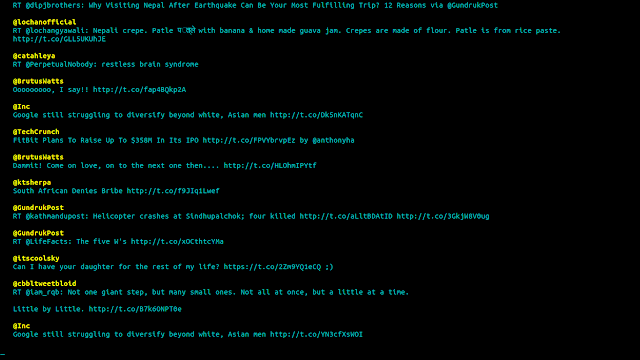
Alright, this is a very cool technique of displaying your twitter feed in your terminal. Along with display, this application called 't' can also post new tweets, replies, retweets(basically everything you do on twitter from a normal browser). Here is a picture of my twitter feed. $ t stream timeline So how to do this? Here are a few steps to be followed on a Ubuntu system(or any Debian-based system) Open up your terminal and type : sudo apt-get install ruby-dev Next, install the application 't' by typing the following : gem install t Go to  http://dev.twitter.com/apps/new  and register your application. Enter all details. Go to  http://dev.twitter.com/apps  and select your newly registered application. Click on Permissions tab and Select Read, Write and Access. Save your settings. Now, switch back to your terminal and authorize the application. t authorize This will open up your browser where you are asked to sign-in into your twitt...