Posts

Showing posts with the label Projects

Web scraping using BeautifulSoup in Python : EAN number vs price from a German e-commerce website
Image
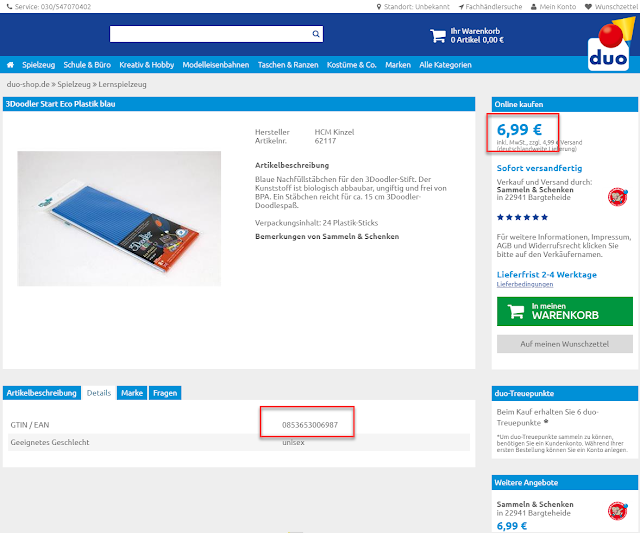
 Input : List of URLs of product category containing list of products to obtain information from. https://www.duo-shop.de/de-DE/List/4/0/0/ https://www.duo-shop.de/de-DE/List/5/0/0/ https://www.duo-shop.de/de-DE/List/70/0/0/ https://www.duo-shop.de/de-DE/List/259/0/0/ https://www.duo-shop.de/de-DE/List/72/0/0/ https://www.duo-shop.de/de-DE/List/73/0/0/ https://www.duo-shop.de/de-DE/List/9/0/0/ https://www.duo-shop.de/de-DE/List/690/0/0/ https://www.duo-shop.de/de-DE/List/329/0/0/ https://www.duo-shop.de/de-DE/List/537/0/0/ Task : Get EAN number and associated price for each EAN number. Output : Spreadsheet(or CSV) with EAN and price columns. Separate file for each product category. We begin by investigating the website to be scraped from. It's a german e-commerce website selling wide range of product(product type doesn't matter for what we're trying to achieve here). All product listing follow html structure, so if we can get information of one EAN, we can...

Building a local weather station using Raspberry pi W and Arduino Nano || Serial communication over Bluetooth HC-05 module

Image
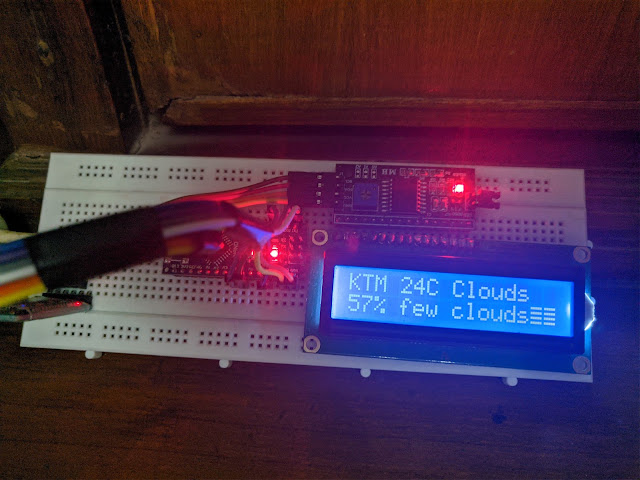
  So this DIY Weather Station involves a few different Hardware modules and a little bit of programming. The idea is, to display the weather status, temperature and humidity levels on a LCD Display that gets updated on a hourly basis. Our Raspberry pi W is going to host the programs and is responsible for sending the correct data from the internet to the Arduino Nano over a Serial communication. We'll make use of the bluetooth module to connect to the bluetooth capabilities of pi to send the data over to the display unit. Things required : Raspberry Pi Zero W x 1 Arduino Nano x 1 LCD 1602 Display x 1 I2C module x 1 Bluetooth HC-05 module x 1 Jumper wires for making connections 5V power source for both raspberry pi and arduino nano (we can power other modules from nano board) Setup Arduino Nano Our LCD Display Module can be connected to Arduino nano in two ways, with or without I2C module. Without it, we'll need to connect 8 pins to the Arduino which is tedious and time consumin...

Building a news app in react-native using Expo and Express on the Node.js server

Image
The blog post is divided into two sections, in first we will explore creating a basic server for our application. This server uses basic web scraping techniques to retrieve data from a trusted news portal. We are only scraping article title and article link, but can expand feature to include more data as well. In the next section, we will create an a cross-platform app from scratch for both iOS and Android. This app is going to retrieve the data from the server we created in Section 1 and display to the user. Section 1 Building a server : npm install --save express request-promise cheerio Add these dependencies to a new file newsAPI.js. const express = require("express"); const app = express(); const rp = require("request-promise"); const $ = require("cheerio"); app.use(express.json()); app.get("/", (req, res) => {   res.send("Hello !!!"); }); const port = process.env.PORT || 3000; app.listen(port, () => console.log(`http://localh...

Developing a Twitter bot that lets me watch Youtube videos on random!

I have been getting back to building bots. I think bots are beautiful. Bots are the future. I just finished watching Altered Carbon first Season on Netflix and the Matrix-like world reminded me of how close we are to AI taking over. But I am getting ahead of myself. Check this out: Javi Reina - Alex Guerrero feat. Syntheticsax - Oig 2010 https://t.co/Jczom6C5L9 @sndpwrites #nWriter — nWriter (@nWriterdotcom) April 16, 2018 This post is going to be a part of a series of things I am working on with my bot. I'm having fun. My bot is listening to mentions at @nWriterdotcom. Currently I am filtering out any other tweets that do not have the hashtag ( #youtubeme ) so I can identify different sources of automated tweets(There's a lot).  Right now my bot does this : 1. Listen to mentions containing hashtag #youtubeme 2. Collect public username of source twitter account 3. Generate a random youtube video link with its full information. 4. Bundle it all together into on...

Working with string manipulation and basic file io operations in Python

Image
Last night, this tweet appeared in my timeline and caught my attention. The word "friends" is said in every episode of Friends. — Fact (@Fact) March 9, 2018 This doesn't sound right. There was no possible way to verify this and I expressed my concern over the same. A friend suggested counting the word in subtitle file for all episodes. I liked the idea, and a small weekend project was born. Before I give the spoilers away on whether or not it is true, I want to first clarify a few different things on how I got it done. I didn't have the subtitles file so I had to download them all before parsing the word "friends". I began by looking at websites that would let me download the english subtitle files the easiest way possible. Originally I had planned to use urllib   with BeautifulSoup to download the files but TV Subtitles made it really easy for me(kudos to the site developers btw). They let you download seasonwise bulk zip files of all episodes...

Top 6 things to do after installing Ubuntu and also save laptop battery life

I have frequently heard complaints about how Ubuntu is draining battery life of their laptop. While this doesn't happen in all the machines, it has happened to mine and I have had to search the internet to fix them. I have put together a list of a few things to do after a fresh installation of Ubuntu x.x. Not all steps mentioned below are required for conserving battery life, but they made sense when talking about a fresh installation of Ubuntu. 1. Get rid of Unity Desktop Environments are a integral part of your OS. They need to serve as good aesthetics in terms of design as well as a stable backend application. Unity is neither. You are better off with Gnome . Or, if your system needs to handle power-friendly DE, go for XFCE . I use i3 desktop manager but I wouldn't recommend it unless you have already used Linux for a while and are familiar with all the terminal commands. First remove Unity. sudo apt-get remove unity unity-2d unity-2d-panel unity-2d-spread unity-asset...

Home Alarm System using PIR sensor and buzzer(Simple)

Image
Lately there has been tales of burglars walking around in my community. They make their way into homes and steal whatever they could find. Hearing this, I thought I should develop a security system that would atleast alert people of intruders into their houses. The following are the things I used : 1. Arduino UNO 2. PIR sensor 3. Electric Buzzer 5V 4. 100 Ohm resistor The circuit is pretty simple. The PIR sensor has three pins, Vin, GND and Vout. I connected the GND and Vin to GND and 5V respectively of Arduino. I connected Vout to pin 2. Electric Buzzer has two pins Vin and ground that were connected to pin 10 and GND respectively. The buzzer heated up pretty fast so I connected 100 Ohm resistance between the ground and Arduino GND pins. I found a code here  that works with the setup I made. I uploaded it to the Arduino and tested it at different distances. I fixed it along the wall of the main hallway at the height of 5 ft to ensure its accuracy. Our code i...

Setting personal Home server with Raspberry Pi 3(with updates)

Lately i decided that I don't want my laptop running at all times for trivial tasks, like downloading files, checking mail and so on. Also I had to constantly move files around from my laptop to desktop to mobile phone whenever I needed something. Having a NAS(Network Attached Storage) would solve that issue by keeping all my files in one place. So, I decided to make a home server using my Raspbery Pi 3 that would cater to my needs. The process is pretty simple. 1. Install Raspbian. Lite will do. 2. Setup Raspbian with ssh and auto login enabled. 3. Setup Samba server. Installing Raspbian on a Memory Card is pretty straightforward. First using a card reader to connect it with laptop USB. Check device name using df -h . It is usually mounted as /dev/sdb, or /dev/sdb1, /dev/sdb2, ... if you have multiple partitions. Unmount every one of them with umount /dev/sdb . Then I extract the downloaded file to obtain an .img image file. Use of dd command as follows: dd bs=4M if...