Posts

Showing posts with the label Tech

Five advantages of Raspberry Pi Zero over Raspberry Pi 3
Image
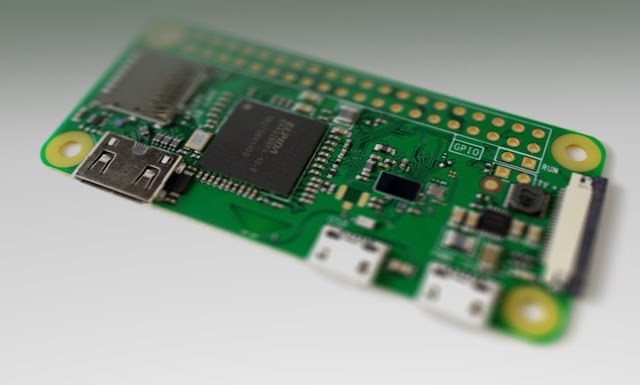
Raspberry Pi has revolutionized the world of single-board computers, enabling enthusiasts, hobbyists, and professionals to bring their innovative ideas to life. While Raspberry Pi 3 has been a popular choice for numerous projects, the introduction of Raspberry Pi Zero has brought its own set of advantages and possibilities. In this post, I will delve into the advantages offered by Raspberry Pi Zero over its predecessor, Raspberry Pi 3. 1. Compact Size and Affordability: One of the standout features of Raspberry Pi Zero is its compact size. Measuring just 65mm x 30mm x 5mm, it is significantly smaller than the Raspberry Pi 3, making it ideal for projects with space constraints or those requiring portability. Additionally, Raspberry Pi Zero comes with a lower price tag, making it an affordable option for budget-conscious users. 2. Power Efficiency: Raspberry Pi Zero consumes considerably less power compared to Raspberry Pi 3. This makes it an excellent choice for projects that run on bat...

My top five self hosted application

Image
I have always loved self-hosted servers. You learn a lot of your craft by managing your own set of applications. You get to troubleshoot setups, identify gaps and even improve server resilience. Besides, they make for a nice free alternative to paid online services. One immediate benefit of self-hosted applications is you don't need an internet connection. It is possible to access them from within the home network with no connectivity. If you do need to access them from outside, there are tons of services available for that in both free and paid tiers. Maybe we'll cover them in another post. On a small note, self-hosted applications aren't for everyone. And they aren't suitable for every purpose. I read this post once where the author went through painstaking steps to set up their mail server. But that's nowhere as reliable as any other online e-mail service provider. Self-hosted is usually a fruit of passion and not commercially viable. That being said, let's l...

Moving codebase from one git repository to other

Ever since github opened private repository feature to general user, all the developers have been moving their project repo to github. I myself too jumped on the bandwagon recently, and started putting up old projects as well as unfinished ones(there's a lot of those) as private repos in github. I had been taking shelter under gitlab and bitbucket as a backup place for them, but decided it was time to move them to github once and for all. Steps : 1. First I pulled the projects off of the old repo, using the following line :     git clone <git-project-url from old repo> 2. After getting inside the project directory, I used the following command to point it to my newly created repo in github.     git remote set-url origin <git-project-url from github> 3. I entered the following to confirm the change worked.     git remote -v Now, if you didn't have a README.md file on the previous repo, but github created one for you when you created the repo, thi...

Publishing your first app built using Expo to Android Play Store and iOS App Store without using a Mac hardware

This sounds like what a lot of beginner developers need right now. You make an app and you want it to be available to users instantly without having to distribute using pesky installation files or google drive links. Also, when you start out on Expo, you hear a lot of 'cross-platform' keywords being thrown around, and that's what brought you to Expo in the first place. Now that you're ready to start sharing, you need help publishing it to the stores and making it instantly ready, so you can focus on other things such as marketing, testing, feature upgrade and so on. This guide attempts to piece together what you'd need to for publishing your app to both android and ios store. And yes, you don't necessarily need a MacOS hardware for publishing to iOS App store. Once you're ready with making all changes, you're ready to build the production version. Pre-requisites Firstly, update the version code in your app.json file. This is done so that each time you up...

Exposing VMware linux server image's IP address to local area connection

Recently, we decided to move our SOHO RHEL server at office to a more permanent location. After powering it on in its new location, we discovered the network was not working. We used to log in to a static IP address of the device using ssh via PuTTY from our laptops to get into the server environment. We hadn't started doing a port configuration system yet, so it must have been something within the physical machine itself. When I joined the team the entire thing was already setup so I hadn't got a chance to look at how we were working with it so far, and this was an opportunity for me to go and take a look at it. Here's how we were using our server. A RedHat Linux Server Disk Image file running on VMWare Pro installed on a Windows 10 machine. First I thought it was a disk image issue and removed all image and configuration files from VMWare. After re-adding the disk image file the system booted perfectly but we weren't getting the previous static IP address as bef...

Developing a Twitter bot that lets me watch Youtube videos on random!

I have been getting back to building bots. I think bots are beautiful. Bots are the future. I just finished watching Altered Carbon first Season on Netflix and the Matrix-like world reminded me of how close we are to AI taking over. But I am getting ahead of myself. Check this out: Javi Reina - Alex Guerrero feat. Syntheticsax - Oig 2010 https://t.co/Jczom6C5L9 @sndpwrites #nWriter — nWriter (@nWriterdotcom) April 16, 2018 This post is going to be a part of a series of things I am working on with my bot. I'm having fun. My bot is listening to mentions at @nWriterdotcom. Currently I am filtering out any other tweets that do not have the hashtag ( #youtubeme ) so I can identify different sources of automated tweets(There's a lot).  Right now my bot does this : 1. Listen to mentions containing hashtag #youtubeme 2. Collect public username of source twitter account 3. Generate a random youtube video link with its full information. 4. Bundle it all together into on...

Working with string manipulation and basic file io operations in Python

Image
Last night, this tweet appeared in my timeline and caught my attention. The word "friends" is said in every episode of Friends. — Fact (@Fact) March 9, 2018 This doesn't sound right. There was no possible way to verify this and I expressed my concern over the same. A friend suggested counting the word in subtitle file for all episodes. I liked the idea, and a small weekend project was born. Before I give the spoilers away on whether or not it is true, I want to first clarify a few different things on how I got it done. I didn't have the subtitles file so I had to download them all before parsing the word "friends". I began by looking at websites that would let me download the english subtitle files the easiest way possible. Originally I had planned to use urllib   with BeautifulSoup to download the files but TV Subtitles made it really easy for me(kudos to the site developers btw). They let you download seasonwise bulk zip files of all episodes...

Top 6 things to do after installing Ubuntu and also save laptop battery life

I have frequently heard complaints about how Ubuntu is draining battery life of their laptop. While this doesn't happen in all the machines, it has happened to mine and I have had to search the internet to fix them. I have put together a list of a few things to do after a fresh installation of Ubuntu x.x. Not all steps mentioned below are required for conserving battery life, but they made sense when talking about a fresh installation of Ubuntu. 1. Get rid of Unity Desktop Environments are a integral part of your OS. They need to serve as good aesthetics in terms of design as well as a stable backend application. Unity is neither. You are better off with Gnome . Or, if your system needs to handle power-friendly DE, go for XFCE . I use i3 desktop manager but I wouldn't recommend it unless you have already used Linux for a while and are familiar with all the terminal commands. First remove Unity. sudo apt-get remove unity unity-2d unity-2d-panel unity-2d-spread unity-asset...

Why NOT to root your android smartphone

Yes, it sounds a bit unorthodox. But I wanna point out that I am not discouraging you playing around with your phone's features. Yes, it unlocks a ton of features. But with great power comes great responsibilities. Whenever someone asks me to help them root their phone, I first ask them why specifically then want to root their phones. If I don't get a convincing answer, I don't help them and advise them not to do it. Because rooting phone exposes phone to a lot of security risks that weren't previously there. I want to talk about one specific one that I have personal experience with. So, recently I had my phone rooted, pretty standard procedure. Nothing out of the ordinary. I also installed a terminal emulator from the app store. I liked to browse around the filesystem in my phone. Looking at directories and comparing them with my laptop's Linux machine. And then I saw this line of command somewhere in the internet. rm -rf / Yeah, it looks bad. I g...

Trouble with youtube-dl in terminal?

"Signature extraction failed" For the last month or so, whenever I use youtube-dl to download a favorite lyrics video I was getting this error. EVERYTIME. I like my videos downloaded and saved, instead of having to open up a browser everytime I want to listen that same old song. Anyways, It suggested me to update the package and so I did. But apparently ubuntu repository did not have the latest package and it seemed like it wasn't updating it anytime soon. I checked the version and it was an old one last updated somwhere in the middle of 2016.  I was going to open an issue on yt-dl github page but got too lazy. So what I did was install it from python package manager instead of apt manager in ubuntu. 1. sudo apt remove -y youtube-dl 2. pip install youtube-dl It is working like before. Now I need to use pip to update my youtube-dl package(they release an update every two weeks or something according to their github page). I still would like to see what was causin...

Piping Twitter Feed into your Terminal!

Image
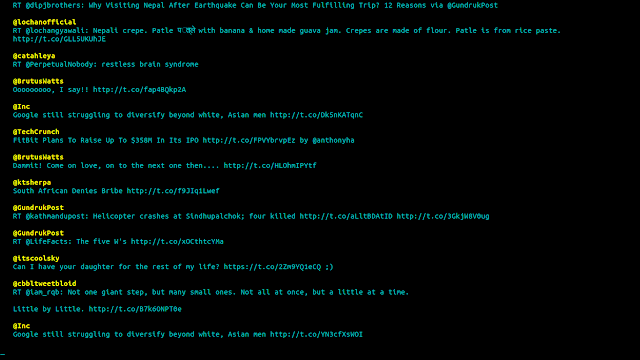
Alright, this is a very cool technique of displaying your twitter feed in your terminal. Along with display, this application called 't' can also post new tweets, replies, retweets(basically everything you do on twitter from a normal browser). Here is a picture of my twitter feed. $ t stream timeline So how to do this? Here are a few steps to be followed on a Ubuntu system(or any Debian-based system) Open up your terminal and type : sudo apt-get install ruby-dev Next, install the application 't' by typing the following : gem install t Go to  http://dev.twitter.com/apps/new  and register your application. Enter all details. Go to  http://dev.twitter.com/apps  and select your newly registered application. Click on Permissions tab and Select Read, Write and Access. Save your settings. Now, switch back to your terminal and authorize the application. t authorize This will open up your browser where you are asked to sign-in into your twitt...